Rack Cable Management: What a Tidy Rack Is Worth (and What a Bad One Costs)
A well managed rack is one where any single cable or device can be found, traced and changed without touching anything else. That is what separates a fifteen minute fault from a night on the floor, and it is set when the rack is built, not afterwards.
On this page
Don't let this be your rack
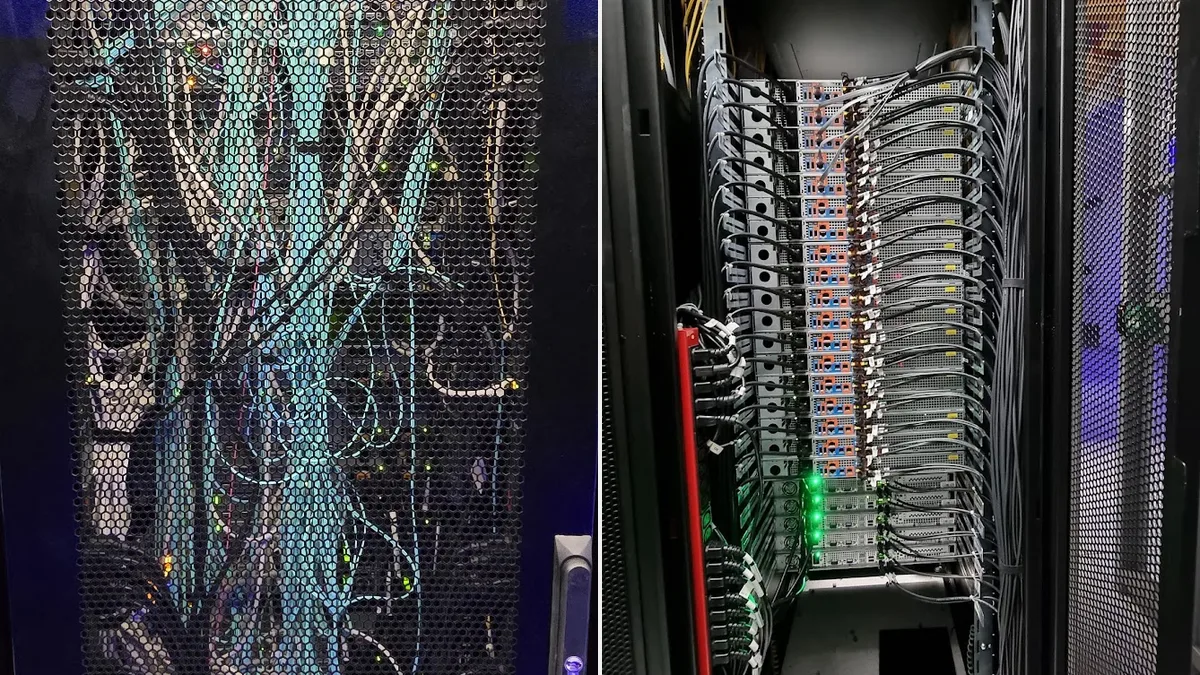
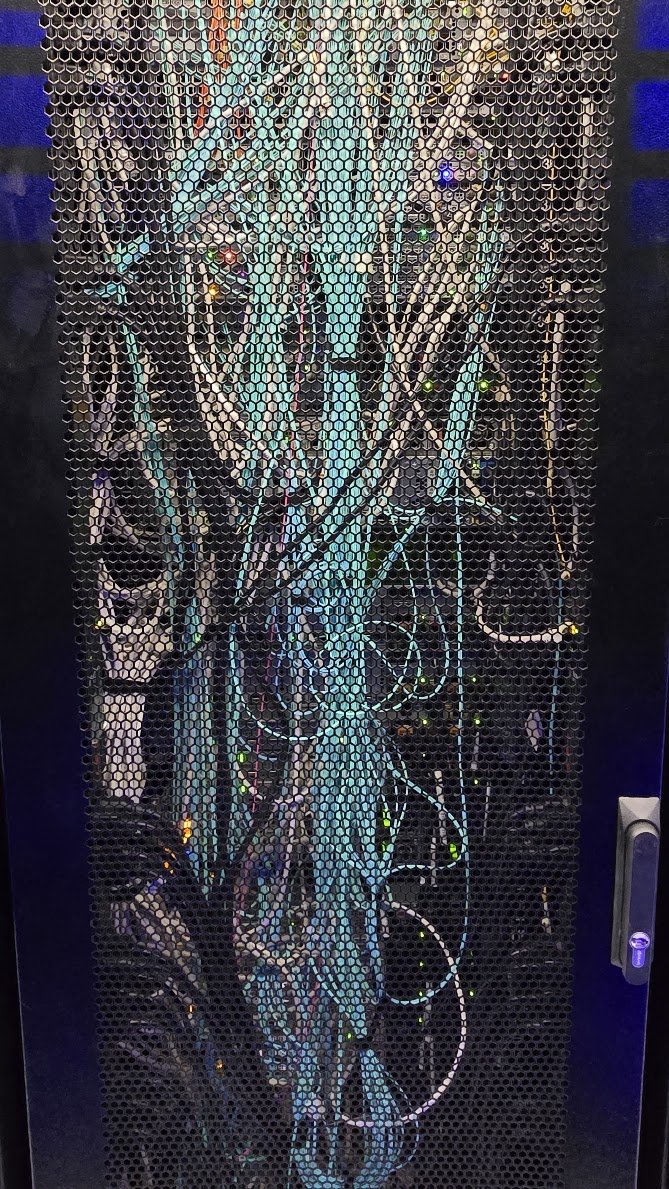
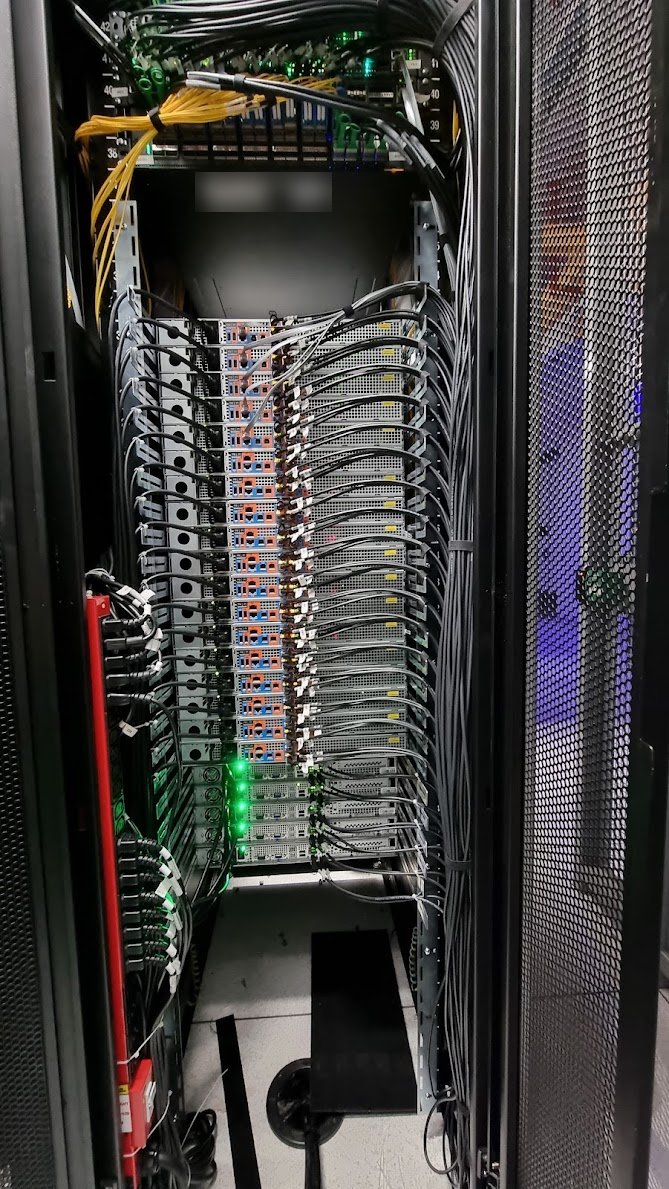
Two racks, same job on paper: get every cable where it needs to go. Left, a rack seen through its perforated door with the cable mass filling the space. Right, the rear of a rack of 38 servers, routed and tied. Labels are blurred.
What a messy rack costs
A messy rack rarely fails on its own. It makes every later job slower and riskier, and the cost turns up on the night something else breaks.
| Where it hurts | Messy rack | Tidy rack |
|---|---|---|
| Finding a cable | Trace it by hand through the bundle, or pull and see what drops | Read the label at both ends, check the port, done |
| Replacing a server or power supply | Other cables sit across the part you need to pull, so live cables get moved to reach it | One server comes out without touching its neighbours |
| Airflow | Cable mass across the rear of equipment and in the exhaust path holds heat in | Cables run to the sides and the rear of the equipment stays clear |
| Adding equipment | No room in the bundles, so new cables go over the top of old ones | Capacity left in the pathways, new runs follow the same route |
| Risk to live services | An elbow or a pulled lead drops a link nobody was working on | Moving one lead moves one lead |
| Audit, handover, decommission | Nobody can say what plugs into what without a trace | The label records match what is in the rack |
None of that needs a statistic to be true, and we have not put one on it. Every row is time on the floor, and time on the floor is what smart hands and colocation work is billed in.
The tidy rack in the photo
The right hand photo is the rear of a rack we filled at an Equinix data centre in Sydney: 38 1RU servers with four SFP cables each. That is more than 150 network leads in one rack, plus power to every server. It looks calm because the rules in the next section were followed from the first server, not applied at the end.
- Network leads run from each server to the sides of the rack, then up to the switch at the top in bundles.
- Power leads go to the power strips on the sides, kept away from the network bundles.
- Every bundle is tied at intervals, so one server can be pulled out without disturbing the rest.
- The front of every server is clear, so drives, fans and power supplies can be reached.
The job itself is on our smart hands page. The left hand photo is the other way: a rack seen through its perforated door, where the cable mass has taken over the whole space. Rack numbers and device labels are blurred in the photos.
The rules we follow on every rack
These are our working rules, not a published standard. Where a standard exists, it is named.
| Rule | Why |
|---|---|
| Right length leads, not a 3 m lead for a 0.5 m run | Spare lead has to go somewhere. Coiled slack blocks airflow and hides faults. |
| Power on one side, data on the other where the rack allows it | Keeps the bundles apart so either set can be worked on alone. |
| Hook and loop ties on bundles, not zip ties | They can be undone and redone without cutting, and they are harder to over-tighten onto a cable. Snipping old zip ties during a change also risks nicking the leads beside them. |
| A short service loop only where a device slides out | Rails need enough lead to travel. Anything beyond that is slack. |
| Nothing across fans, power supplies or drive bays | You should be able to hot swap a part without moving a cable. |
| Follow the cable maker's bend radius, especially for fibre | Tight bends raise loss on fibre and can break it. Use the figure on the datasheet for that exact cable, not a rule of thumb. |
| Label both ends of every cable | A label at one end only means a trace for every change. ANSI/TIA-606 is the standard for labelling and records, and a record covers the identifier, source, destination, cable type and length. |
| Photograph and map the rack when you finish | A photo and a port map taken on the day are worth more than anything reconstructed later. |
Check your colocation provider's own cabling rules before you start. Facilities set their own requirements for cable types, ties and pathways, and those win over anything here.
Fixing a bad rack without an outage
A rack like the left hand photo can be tidied without taking services down, but not in an afternoon and not by pulling things to see what happens.
- Photograph and map first. Record what is in each U and which port each cable lands on before anything moves.
- Label before you re-route. Both ends, so the trace only happens once.
- Work one cable at a time. Move it, re-seat it, confirm the link is up, then the next. Never unplug a group.
- Agree the order with the service owner. Redundant paths (A and B power, dual uplinks) go one side at a time, with the other side confirmed healthy.
- Put it in a change window with a written plan. The format is in our smart hands MOP and ticket guide.
- Replace what cannot be saved. Over long or damaged leads are swapped for the right length, not tied up.
If the rack is going away rather than being tidied, the same mapping applies. See data centre decommissioning in Sydney.
Checklist before you leave the rack
- Every cable labelled at both ends, and the labels match your port map.
- No lead pulled tight, kinked or bent past its limit.
- Nothing across fans, power supplies or the front of any server.
- Bundles tied, with room left to add the next one.
- Every link light and power light checked against what should be live.
- Photos of front and rear taken and filed with the port map.
- Packaging, offcuts and cut ties taken away.
FAQ
Are zip ties banned in racks?
No. Some facilities and installers use them, and they hold well. We prefer hook and loop on bundles because they can be undone without cutting and are harder to over-tighten. Check your colocation provider's rules, which take priority.
Can you tidy a rack while it is live?
Often yes, one cable at a time with the link checked after each move, and with redundant paths handled one side at a time. A rack with no redundancy and no port map is a job for an agreed window.
Does this matter for a small office comms cabinet?
Yes. The same problems turn up at smaller scale: unlabelled patch leads, slack across the switch and no record of which wall port is which. Tidying a cabinet is usually a short job.
How much does a rack clean up cost?
It depends on the number of cables, whether the rack is live and whether leads need replacing. We quote after a look at the rack or photos, and we do not publish a price for data centre work.
Need a rack cabled, tidied or documented?
Smart hands for installs, clean ups and re-cabling in Sydney data centres.