NDIS assistive technology support, setup and repairs in Sydney
When assistive technology stops working, you need someone who understands the technology. We set up, integrate, troubleshoot and repair the computers, software and networks around AAC, eye-gaze and switch systems, on-site across Sydney.
We do the technical work. Your OT, speech pathologist or AT advisor decides what is needed, and we make it work. Complex jobs are quoted before work begins.
- Sydney IT company since 2003
- On-site, Artarmon and Narrabeen
- PC, Mac, iPad and networks
- Quoted before work starts
- What we do
- Technical setup, integration, troubleshooting, repairs and ongoing support for assistive technology
- What we don't do
- Clinical or AT assessments, prescribing equipment, therapy or AAC training
- NDIS status
- Not an NDIS registered provider. Self-managed and plan-managed participants can engage us directly
- Where
- On-site Northern Beaches and North Shore. Remote support where the device allows it
- Price
- Quoted after we understand the equipment and the problem
What we can help with
The technology around the participant's assistive system
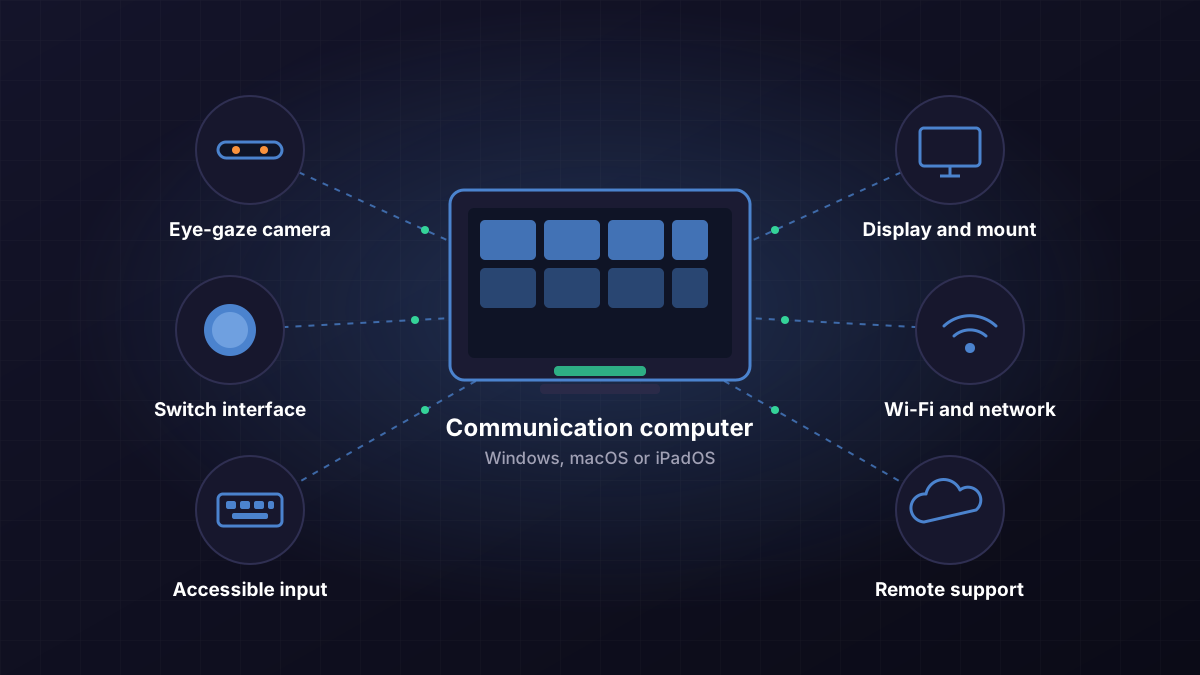
Specialist assistive technology problems are hard to solve with a normal computer repair company. Most of these systems are a Windows, macOS or iPadOS device running specialist software, with extra hardware attached, on a home network. That is the part we work on.
Communication devices
Dedicated speech-generating devices and communication computers: power, audio output, speakers, charging, operating system and the communication software itself.
AAC software and apps
Installing, licensing, updating and backing up AAC software such as Grid 3, TD Snap and Proloquo2Go, and moving a user's settings to a new device without losing them.
Eye-gaze systems
Eye trackers and their drivers, USB connection, display scaling, positioning of the camera relative to the screen, calibration software and the link into the communication software.
Switch access
Switches, switch interfaces, USB and Bluetooth pairing, and the switch settings in the software, in Windows, and in Switch Control on iPad and Mac.
Accessible computers
PCs and Macs set up for a specific access need: accessibility settings, user accounts, power and sleep settings that suit the user, and updates that don't arrive mid-conversation.
Screen readers and speech
Screen readers (NVDA, JAWS, Narrator, VoiceOver), magnifiers, speech-to-text such as Dragon and built-in dictation, and text-to-speech voices.
Specialist input devices
Large-key and keyguard keyboards, trackballs, joysticks, head pointers and alternative mice: drivers, button mapping, pointer speed and dwell settings.
Environmental control
Smart plugs, lights, TV and door controls operated from a communication device or voice assistant: the Wi-Fi, hubs, apps and accounts that make them respond. Fixed wiring stays with a licensed electrician.
Visual and tactile alerts
Doorbell, phone and alarm alerts that flash or vibrate, and the apps, receivers and network connections behind them.
Device and network integration
Getting the device, computer, display, switches, Wi-Fi, cloud accounts and remote support to work together as one system, and documenting how it is set up.
Product names are examples of software and hardware we can configure. They do not mean eWEB TEC is a supplier or agent for those brands.
When people call us
The calls we get, and what we check
Families and support workers usually know that something has changed, but cannot tell what. We work through the chain from power to software until we find the fault, then tell you what it is in plain English.
"My communication device has stopped working."
We diagnose the computer, software, peripherals, connections and configuration to find the technical problem.
- Power, battery and charging
- Operating system start-up and user account
- Audio output and speaker
- Communication software licence and user file
"The eye-gaze system isn't responding properly."
We look at the computer, operating system, drivers, calibration, connections and software, and work with your AT or clinical professional where settings need their judgement.
- Eye tracker driver and firmware version
- USB port, cable and power management
- Display resolution and scaling
- Lighting and camera position against the manufacturer's guide
"The switch works sometimes and then stops."
Intermittent faults usually come from a connection or a setting, and the switch itself is often fine. We test each link.
- Switch, cable and jack
- Switch interface, USB or Bluetooth pairing
- Battery levels and sleep settings
- Scan and switch settings in the software
"The new equipment has arrived and nobody can get it all working together."
We install, configure and connect the technology to the specification your OT, speech pathologist or supplier provided, then test it with the person and their carers.
- Software, drivers and licences
- Eye-gaze, switches and input devices
- Wi-Fi, accounts and backups
- Written notes on how it is set up
"An update has broken the system."
We investigate the software, configuration and compatibility, and restore the system where possible.
- Which update changed what
- Driver and software compatibility
- Rolling back or reinstalling safely
- Update settings so it doesn't happen mid-week again
"The old device is failing and a replacement is coming."
We move the user's set-up across so the new device works the way the old one did.
- Vocabulary and user files backed up first
- Licences transferred where the vendor allows
- Access settings and peripherals re-matched
- Old device wiped before it leaves the house
Integration
The fault is often between devices
A working setup can involve an AT device, a computer, a display, a mount, switches, an eye tracker, Wi-Fi, cloud accounts, several pieces of software and remote support. Each supplier supports their own part. When the fault sits between two of them, nobody owns it.
That gap is where we work. We have been making computers, networks and software work together for Sydney homes and businesses since 2003, and assistive technology is the same discipline with higher stakes.
- Access methodEye-gaze camera, switches, touch, head pointerDevice supplier
- AT software and user filesCommunication software, vocabularies, voices, licencesSoftware vendor
- Connections between themDrivers, USB, Bluetooth, calibration, settingsOften nobody
- Operating systemWindows, macOS or iPadOS, updates, accountseWEB TEC
- HardwareComputer, display, audio, mount, powereWEB TEC or supplier
- Network and remote supportWi-Fi, cloud accounts, backups, remote accesseWEB TEC
Who repairs what
Some faults belong with the manufacturer or the supplier who provided the equipment. Knowing which is which saves weeks. We tell you straight when a job isn't ours.
| Problem | Usually handled by | Where eWEB TEC fits |
|---|---|---|
| Hardware fault inside a dedicated speech-generating device or eye tracker | The manufacturer or original AT supplier, often under warranty | We confirm the fault is the device and not the computer, cable, network or settings before it is sent away |
| Equipment that is leased or hired | The rental provider | Same check first, then we hand over our findings |
| Which device, vocabulary or access method suits the person | Speech pathologist, OT or AT advisor | We set up what they specify and tell them if something won't work technically |
| Teaching the person to use their AAC | Speech pathologist or AT mentor | We show family and support workers the technical basics: restart, reconnect, restore |
| Windows, macOS or iPadOS, drivers, updates and accounts | eWEB TEC | Diagnose, repair, reinstall and restore |
| Wi-Fi, Bluetooth, network and remote access | eWEB TEC | Design, set up, secure and document |
| Mainstream hardware: PC and Mac parts, displays, cables, keyboards | eWEB TEC | Replace, test and commission on-site |
| Making all of the above work together | eWEB TEC | Integration, testing and written configuration notes |
Services
Three ways we usually start
Each is quoted after we understand the equipment and the problem. We would rather spend ten minutes on the phone first than send an engineer to guess.
Assistive Technology Technical Assessment
Quotedafter a call about the equipment
A technical check of the existing device or system. It finds what is wrong and what it would take to fix.
- Hardware and peripherals
- Software, versions and licences
- Connections, USB and Bluetooth
- Network and remote access
- Configuration and compatibility
- Written findings you can pass to your plan manager, support coordinator or AT advisor
This is not a clinical or AT assessment. It does not decide what equipment a person needs.
Assistive Technology Setup and Integration
Quotedfrom the equipment list and specification
For newly supplied equipment, or a change to an existing system.
- Software, drivers and licences installed
- Eye-gaze, switches and input devices connected and configured
- Display, audio and mounts matched to the computer
- Wi-Fi, accounts, updates and backups set up
- Remote support access, with consent
- Tested with the person and carers, and written notes left behind
We work from the specification your OT, speech pathologist or supplier provided.
Assistive Technology Repair and Recovery
Quotedafter diagnosis
For systems that have stopped working or have become unreliable.
- Diagnosis across hardware, software and network
- Replacement parts for mainstream hardware
- Operating system repair or reinstall
- User files, vocabularies and settings restored
- Specialist equipment reconnected
- Tested and commissioned before we leave
Manufacturer hardware faults and warranty claims go back to the supplier. We tell you when that is the case.
Ongoing technical support
Once a system is working, most families want one number to call when something changes. After a first job we can agree ongoing support that covers remote sessions where the device allows them, on-site visits, configuration changes, managed software updates, replacement device setup, technical advice and a point of contact for carers and support workers. It is set up as an agreed arrangement for your system.
NDIS funding
Can NDIS funding be used for assistive technology repairs and support?
Often, yes, but it depends on the participant's plan and circumstances, and on the assistive technology meeting the NDIS requirements. We don't decide what the NDIS will fund, and we can't get funding approved. We can quote the technical work and help you understand what information your plan manager, support coordinator or AT advisor may need.
Where repair money sits in an NDIS plan
| Kind of work | What the NDIS says |
|---|---|
| Repairs and maintenance of AT you use | Funding is included in the plan for all AT the participant currently uses. It is added when mid-cost to high-cost AT is approved, and no AT assessment is needed for it to be included. |
| Small repairs | Core supports budget, under consumables. |
| Major repairs and regular servicing | Capital supports budget, under assistive technology repairs and maintenance. |
| Accidental damage | Covered by the repairs and maintenance funding, because warranties usually don't cover it. |
| Faulty when supplied | A warranty matter with the supplier. Consumer rights apply to AT bought with NDIS funding. |
| Not enough funds left | Call the NDIS on 1800 800 110 to ask about more funding for AT repairs. |
Quotes, urgent repairs and plan management
| Situation | What happens |
|---|---|
| Repair over $1,500 | A quote must be given to the NDIA before a payment request is accepted. We write itemised quotes: the fault, what was tested, parts and labour. |
| Repair under $1,500 | No quote is needed by the NDIA. We still quote you before we start. |
| Urgent repair | Applies when the AT stops working, there's no back-up, and there's a risk to safety or wellbeing. Communication AT is included. In most cases the NDIS caps urgent repairs at $3,000 for AT valued above $15,000, and $800 for most other AT. |
| Self-managed | You pay us, then claim against your plan. |
| Plan-managed | Confirm funds with your plan manager first. We send the invoice to your plan manager, who pays and claims against the plan. |
| NDIA-managed | Needs a registered provider. Talk to us first and we'll tell you honestly whether we can help alongside your registered supplier. |
What is less straightforward
Replacement, not repair
Replacing a device is a separate process from repairing it and may need new evidence from your AT advisor. Our technical findings can support that conversation, but can't replace it.
Everyday laptops, tablets and phones
Mainstream devices are generally not NDIS funded unless they are the assistive technology for that person, for example a tablet that is their communication device. Check with your plan manager or AT advisor.
Training and mentoring
Learning to use AT is a different support from repairing it, usually delivered by a speech pathologist or AT mentor. We don't provide it.
Some work needs a professional's evidence
Where a change affects how the person accesses or uses their AT, your OT, speech pathologist or AT advisor may need to be involved first. We'll say so before quoting.
Source: NDIS, How to repair assistive technology and How to urgently repair assistive technology, checked 27 September 2026. NDIS rules change, so confirm your funding pathway with your plan manager, support coordinator or AT advisor.
How it works
Four steps, no surprise work
- Tell us what's wrongPhone or send an online enquiry. List the equipment if you can: device, software, switches, eye tracker, computer.
- We identify the technology problemHardware, software, configuration, connectivity, network or integration. Sometimes that is clear from the call, sometimes it needs a technical assessment.
- We quote the technical workA written quote before work begins. Where a specialist assessment or the manufacturer is needed, we explain what has to happen and who does it.
- We get the system workingConfigure, repair, integrate and test with the person and their carers, then leave written notes on how it is set up.
Who we work with
The technical specialist on your team
- NDIS participants
- Parents
- Carers
- Families
- Occupational therapists
- Speech pathologists
- AT advisors
- Support coordinators
- AT suppliers
- Disability support organisations
For OTs, speech pathologists and suppliers: send us the specification and the equipment list. We do the technical side, test it with the person, and report back to you. We work with your existing OT, speech pathologist, AT advisor or supplier wherever a clinical or functional assessment is required.
What eWEB TEC does
- Installs and configures AT software, drivers and peripherals
- Connects devices, displays, switches and networks into one working system
- Diagnoses and repairs hardware, software and connection faults
- Restores lost settings, user files and vocabularies from backup
- Writes technical findings and itemised quotes
- Supports the system remotely and on-site afterwards
What stays with your clinicians and supplier
- Deciding what equipment a person needs
- Clinical, functional or AT assessments
- Choosing vocabulary, access method or positioning
- Training the person to use their AAC
- Warranty repairs inside manufacturer hardware
- Getting NDIS funding approved
Not a fit for this service: a slow home laptop or a printer that won't print, unless it is part of the AT system. For those, see computer repairs.
Why eWEB TEC
People who understand computers and make complicated equipment work
Since 2003
A Sydney IT company for over twenty years, with offices in Artarmon and Narrabeen.
We come to you
On-site across the Northern Beaches and North Shore, at home, school, day program or work. There is no drop-off counter.
PC, Mac and iPad
Windows, macOS and iPadOS, including accessibility settings, accounts and update management.
Networks and Wi-Fi
Home and business networks, Bluetooth, and the Wi-Fi coverage that communication and environmental-control devices depend on.
Security, cloud and backups
Remote access set up safely, accounts protected, and configuration backed up so a failed device doesn't mean starting again.
No offshore helpdesk
You deal with Sydney engineers who come back to the same system.
Areas
Where we work
On-site across the Northern Beaches from our Narrabeen base (Dee Why, Collaroy, Narrabeen, Warriewood, Mona Vale, Newport, Avalon) and the North Shore from Artarmon (Artarmon, St Leonards, Crows Nest, North Sydney). Larger setup and integration projects elsewhere in Sydney by arrangement. Remote technical support can be available anywhere, where the device allows it and the participant or their guardian consents.
Frequently asked questions
What families, carers and coordinators ask before the first call.
Request technical supportIs eWEB TEC an NDIS registered provider?
No. eWEB TEC is not an NDIS registered provider. Self-managed and plan-managed participants can use unregistered providers, so they can engage us directly. NDIA-managed participants need a registered provider for NDIS-funded supports; talk to us first and we will tell you whether we can help alongside your registered AT supplier.
Will the NDIS pay for my assistive technology repair?
It depends on the participant's plan and circumstances. NDIS plans include repair and maintenance funding for assistive technology the participant currently uses, but we cannot promise any repair will be funded. We quote the technical work and tell you what information your plan manager, support coordinator or AT advisor may need.
Do I need a quote for an NDIS-funded AT repair?
For repairs over $1,500 the NDIA needs a quote before a payment request is accepted. Under $1,500 no quote is needed by the NDIA. We give you an itemised written quote before starting either way.
Can you tell us which communication device or eye-gaze system to get?
No. That decision belongs with the person's speech pathologist, OT or AT advisor. We can tell them whether a proposed setup will work technically with the existing computer, network and equipment, and then install and configure what they specify.
Do you repair dedicated AAC devices and eye trackers?
We work on the computer, operating system, software, connections, peripherals and network around them, and we repair mainstream hardware. Faults inside manufacturer hardware, and anything under warranty or leased, usually go back to the manufacturer or supplier. We confirm where the fault is first so the device is not sent away for a settings or cable problem.
Do you come to the house?
Yes. Our work is on-site, at home, school, a day program or work, across the Northern Beaches and North Shore. Larger setup and integration projects elsewhere in Sydney are by arrangement. There is no drop-off counter.
Can you support assistive technology remotely?
Often, where the device allows remote access and the participant or their guardian consents. Some dedicated communication devices are locked down and need an on-site visit. We set up remote access securely as part of a setup job.
Do you train the person to use their AAC?
No. Learning to use AAC is a separate support, usually from a speech pathologist or AT mentor. We show family, carers and support workers the technical basics: how to restart, reconnect, update and restore the system.
How much does assistive technology support cost?
Each job is quoted after we understand the equipment and the problem. Most work is a defined job: a technical assessment, a setup and integration, or a repair and recovery. Call +61 407 453 817 or use the contact form with the equipment details.
Assistive technology not working?
Call +61 407 453 817 or send the details: what the equipment is and what it's doing. We'll call you back.
Artarmon NSW 2064 · Narrabeen NSW 2101